
Confirmation & Cancelation of Appointments online Feature

Managing appointments efficiently is crucial for solo healthcare practitioners. With CompanyOn’s Confirmation & Cancellation of Appointments Online feature, your clients now have the flexibility to respond to appointment reminders in real time—without needing to call or email your practice.

A smoother scheduling experience means fewer no-shows, better communication, and more time focused on patient care.
🗓️ What Does This Feature Do?

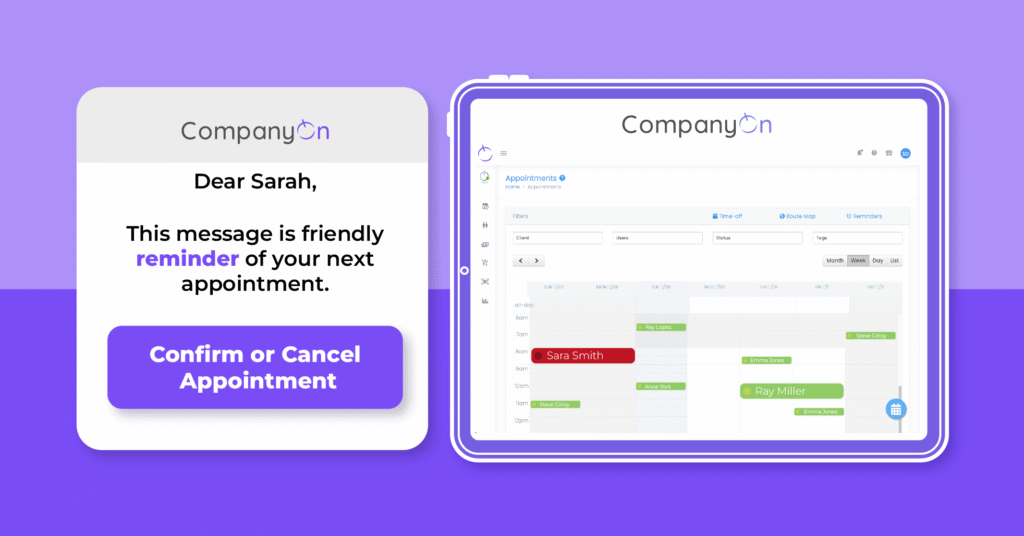
This feature allows clients to confirm or cancel their upcoming appointments directly from the appointment reminder emails or text messages sent via the CompanyOn platform.

📲 This complements our appointment reminder automation tool designed to improve show-up rates and clinic efficiency.


🔧 How It Works – Step by Step

1. Clients Receive the Reminder

Whenever an appointment reminder is sent out (based on your preset schedule), the message includes interactive options:

  • Confirm Appointment

  • Cancel Appointment

This applies whether the reminder is sent via email or SMS.


2. Client Confirms the Appointment

If the client taps or clicks “Confirm”, their confirmation is registered by the system. No further action is required from the provider.

  • ✔️ The status in your calendar remains unchanged.

  • 🔔 No email notification is sent to you, since the appointment is still valid.


3. Client Cancels the Appointment

If the client selects “Cancel”, a window pops up asking them to provide a reason for cancellation.

Appointment Cancelled Message

Once they submit the cancellation:

  • 📩 You receive a notification via email.

  • 🗓️ The appointment is marked in red on your CompanyOn calendar as Cancelled.

💡 Want to learn more about improving your calendar management? Visit our post on instant scheduling tools.


🎯 Why This Feature Matters

This feature was created to:

  • Enhance client-practitioner communication in real time

  • Reduce the administrative load on solo providers

  • Improve appointment workflow and minimize gaps in your calendar

  • Provide clarity for both parties, saving time and resources

🔗 Combine this with our Waitlist Management Tool to quickly rebook cancelled slots and maintain productivity.


✅ Start Using It Today

You don’t need to enable anything manually—this feature is active on your account if you’re already using automated reminders.

Need help setting up your reminders? Check our guide:
👉 How to Set Up Automated Appointment Reminders


Ready to simplify appointment management?

CompanyOn provides everything you need to run and grow your independent healthcare practice—from scheduling and invoicing to clinical documentation and compliance.

📅 Try CompanyOn Free for 14 Days
💬 Speak with Our Team
🔍 Explore All Features

Ready to make the switch?

Try Our Platform Free for 14 days.

See CompanyOn in Action

Schedule A Free 1:1 Personalized Demo

Telemedicine for Independent Providers: What You Need to Know Before Getting Started

The healthcare landscape has evolved—and so have patient expectations. For independent providers, telemedicine presents a powerful opportunity to deliver accessible, convenient, and effective care while scaling your practice intelligently.

Whether you’re a nurse practitioner, foot care specialist, or other solo health professional, implementing telemedicine for providers requires careful planning and the right digital tools.

Let’s explore what you need to know to offer virtual care with confidence, from legal basics to essential app features.

Why Telemedicine Is a Game-Changer for Solo Practices

Adopting telehealth implementation can benefit your practice by:

  • Reaching underserved or remote patient populations

  • Reducing clinic overhead and no-show rates

  • Offering flexibility for both you and your clients

  • Increasing the number of appointments you can handle in a day

  • Enhancing patient satisfaction through convenience

🔗 Related: Virtual Consultations — The New Norm for Practices Post-Pandemic


Step 1: Legal Considerations Before You Begin

Before offering remote patient care, make sure your practice meets all applicable legal and professional standards:

  • Licensing: Ensure you’re authorized to provide care in the regions your patients reside.

  • Privacy: Your telemedicine platform must comply with laws such as PIPEDA, PHIPA, or HIPAA, depending on your jurisdiction.

  • Consent: Always obtain digital informed consent before initiating virtual services.

📄 Use e-consent form templates to simplify this step and ensure legal compliance.


Step 2: Essential Tools for a Professional Virtual Healthcare Setup

Not all platforms are created equal. To deliver virtual care efficiently, your clinic management app should include these must-have telemedicine features:


✅ 1. High-Quality Video Conferencing Integration

Reliable and secure video calling is the backbone of any telemedicine service. Look for:

  • Encrypted, healthcare-compliant video (end-to-end encryption)

  • No third-party logins required for patients

  • In-browser functionality (no downloads)

  • Screen sharing for educational visuals or chart reviews

  • Compatibility with mobile and desktop devices

📹 Pro tip: CompanyOn integrates seamlessly with HIPAA-compliant video tools, making virtual visits easy for you and your patients.


✅ 2. Secure Digital Charting and Clinical Notes

During or after a consultation, you must be able to document care thoroughly and securely. Choose a system that includes:

  • Real-time SOAP note capture

  • Editable and searchable patient records

  • Templates customized to your specialty

  • Multi-device access (mobile/laptop/tablet)

📋 Learn more about charting securely on the go


✅ 3. Online Scheduling and Automated Reminders

Patients should be able to book their virtual visits online, anytime. Your app should offer:

  • Self-scheduling with time zone support

  • Appointment type filtering (in-person vs. virtual)

  • Waitlist management

  • SMS/email confirmations and reminders

📆 See how to schedule patients in seconds


✅ 4. Integrated Billing and Instant Payments

Your system should connect visits with billing and accept payments instantly. Features to look for:

  • Auto-generated invoices after a virtual consult

  • Online payment via credit card or secure platforms

  • Payment tracking and revenue reporting

  • Client-friendly receipts and billing history

💳 Explore our invoicing and payment tools for providers


✅ 5. Patient Portal with Messaging and File Sharing

Enable clients to access visit notes, invoices, and communicate securely. Look for:

  • Two-way encrypted messaging

  • Upload/download of forms or care instructions

  • Virtual intake forms and feedback collection

  • Integration with your EMR or care records

📨 Learn more about facilitating patient communication


Step 3: Set Up Your Virtual Care Environment

Create a space that reflects professionalism:

  • Use a quiet, well-lit room

  • Choose a neutral or branded background

  • Use a quality webcam and microphone

  • Test tech before each visit to avoid glitches

  • Prioritize confidentiality and comfort for your clients


Step 4: Support and Educate Your Patients

Empowering your clients to use telemedicine successfully is part of delivering excellent care:

  • Provide simple login instructions

  • Send appointment links in advance

  • Offer tech support via email or message

  • Follow up with visit summaries or instructions

🛠️ Bonus: Add automated post-visit alerts to reinforce care plans.


Launch Virtual Care With Confidence

Offering telemedicine as a solo practitioner doesn’t have to be overwhelming. With the right tools and preparation, you can extend care beyond your clinic walls—improving both client experience and operational efficiency.


Power Your Practice With CompanyOn

CompanyOn gives you everything you need for telehealth in one place:

✅ Video consultations
✅ Secure charting
✅ Scheduling and billing
✅ Patient messaging
✅ Mobile access—anywhere, anytime

🚀 Start your free 14-day trial
📅 Book a live demo
🔍 See all features for independent providers


Deliver care from anywhere. Stay compliant. Grow your practice with confidence—only with CompanyOn.

Ready to make the switch?

Try Our Platform Free for 14 days.

See CompanyOn in Action

Schedule A Free 1:1 Personalized Demo

CompanyOn Client’s Route Map

Clients’ visit route map

In addition to the ability to access google maps directly from your CompanyOn calendar to get directions to your next visit, we are happy to share two new features on CompanyOn Maps that help our mobile practitioners see the geographical location of their clients and the route to follow for every visit ahead of time. 

Let’s show you how it works.

There are two versions of CompanyOn maps. One provides a picture of where all your clients are located.

Email Notification

And the second version, provides you with the exact route of your visit for each day. Helping you know exactly each location so that you know how far away one visit is from the next one chronologically, and plan your day ahead.

You can even access your client's file directly from the map, bringing convenience and simplicity to your everyday work activities.

You can access the route map via the calendar and dashboard and the map with the overall geographical location of all your clients via the patient module.

Ready to make the switch?

Try Our Platform Free for 14 days.

See CompanyOn in Action

Schedule A Free 1:1 Personalized Demo

7 Essential Features Your Clinic Management App Must Have

Choosing the right clinic management app is one of the most important decisions solo and small healthcare providers can make. The right tool doesn’t just simplify administrative work—it transforms the way you deliver care, engage with patients, and grow your business.

To stay competitive in today’s digital-first environment, your app must go beyond basic scheduling. It needs to offer a full suite of mobile healthcare solutions designed for agility, efficiency, and patient satisfaction.

Let’s explore the 7 essential features every clinic management app should have.

1. Smart Patient Scheduling Software

Efficient appointment management is the foundation of any healthcare operation. Your app should allow:

  • Online self-booking and cancellations

  • Automated appointment confirmations and reminders

  • Waitlist management and real-time availability updates

📌 Learn how we make scheduling instant and easy


2. Integrated Billing and Invoicing System

A robust clinic management app must streamline your revenue cycle with:

  • Digital invoicing and payments

  • Insurance billing support

  • Real-time payment tracking and receipts

💳 Related: How electronic invoicing can transform your practice


3. Digital Charting and SOAP Notes

Effective documentation is critical in healthcare. Your app should provide:

  • Customizable SOAP note templates

  • Secure and compliant patient charting

  • Real-time updates and access across devices

📝 Explore our digital charting tools for independent practices


4. Mobile Access for On-the-Go Management

Whether you’re visiting patients at home or working remotely, your clinic app must be mobile-friendly. Look for:

  • Full access from phones or tablets

  • Route planning and map integration

  • Offline access for field-based care

📱 Related read: Run your entire practice from your phone


5. Secure Messaging and Patient Communication

Modern patients expect fast, convenient, and secure communication. Your app should offer:

  • Encrypted messaging between provider and patient

  • Automated follow-up messages

  • Patient engagement through secure portals

🔒 See how we support digital patient-provider communications


6. E-Consent and Online Forms

Say goodbye to paper. Your app should let patients:

  • Complete forms digitally before visits

  • Sign consents online

  • Store documents securely and accessibly

🧾 Try our e-consent form templates


7. Analytics and Reporting Tools

Data helps you grow. A quality clinic management app includes:

  • Patient trends and financial reports

  • Appointment frequency and cancellation tracking

  • KPI dashboards to measure performance

📊 Want to improve client retention? Learn about using analytics to enhance patient care

Choose a Solution Built for Solo and Small Practices

Not all apps are created equal. Look for tools designed specifically for solo practice tools—solutions that are intuitive, affordable, and made for lean operations without compromising on compliance or quality.

At CompanyOn, we build software that empowers independent practitioners to focus on what matters most: caring for their patients and growing their business.

Ready to Streamline Your Clinic With the Right Tools?

Start your 14-day free trial today
Book a personalized demo
Explore all features for independent healthcare professionals

Ready to make the switch?

Try Our Platform Free for 14 days.

See CompanyOn in Action

Schedule A Free 1:1 Personalized Demo

Why Patient Empowerment Is Important for your Business

n today’s healthcare landscape, patients are no longer passive recipients of care—they are informed participants, seeking providers who will engage, educate, and empower them. This evolution in patient expectations is driving the rise of patient empowerment strategies that not only improve care outcomes but also strengthen the long-term success of your practice.

Understanding and implementing empowerment principles isn’t just good clinical practice—it’s a smart business move.

What Is Patient Empowerment?

Patient empowerment refers to the process of enabling patients to gain greater control over decisions and actions affecting their health. Empowered patients are active participants in their care, equipped with the information and confidence they need to make informed decisions.

Rather than seeing healthcare providers as sole decision-makers, patients now view them as trusted partners. Your role shifts from authority figure to guide, educator, and collaborator—a shift that, when done right, boosts trust, satisfaction, and loyalty.

📌 Want to strengthen your relationships with clients? Read our guide on Building Therapeutic Relationships With Clients


Why Patient Empowerment Matters for Independent Practices

1. Enhances Patient Satisfaction

Engaged patients feel heard and understood. This personal connection encourages them to stay with your practice long-term.

2. Supports Better Health Outcomes

When patients are involved in their care plans, adherence to treatment improves—leading to fewer complications and better overall health results.

3. Increases Operational Efficiency

Empowered patients rely less on repetitive interactions for basic information, freeing up your time and resources.

4. Drives Business Growth

Practices that prioritize empowerment foster trust and word-of-mouth referrals, which are powerful growth drivers for independent providers.

📈 Explore our article on Strategies to Build a Patient-Centered Culture


Practical Ways to Empower Patients Through Education

Education is one of the most powerful tools for patient empowerment. Here’s how you can integrate it into your care model:

  • Encourage questions: Foster an open dialogue. Ensure patients feel safe asking about their condition or treatment plan.

  • Provide accessible resources: Offer easy-to-understand materials and direct patients to reliable sources.

  • Personalize communication: Adapt your language and tone to the individual—education is most effective when it feels personal.

  • Maintain continuous engagement: Follow up post-visit via email or SMS to reinforce education and build rapport.


Leveraging Technology to Empower Patients

Modern patients expect digital convenience—and when used properly, technology can become a vital tool in empowerment. Here’s how:

✅ Online Forms & E-Consent

Enable patients to review and complete documents at their convenience, enhancing autonomy.
Try our customizable e-consent templates

✅ Patient Portals

Offer access to test results, visit summaries, invoices, and secure messaging—all in one place.
→ Read how patient portals improve care and reduce admin time

✅ Appointment Management Tools

Empower patients to book, confirm, or reschedule appointments anytime, from anywhere.
→ Explore automated scheduling solutions


Empowerment Is a Growth Strategy

In a competitive and rapidly evolving healthcare landscape, empowerment isn’t optional—it’s essential. By adopting a patient-first, tech-enabled, and education-based approach, your practice stands to:

  • Improve clinical outcomes

  • Reduce operational burden

  • Strengthen client relationships

  • Boost your business reputation


At CompanyOn, We Help You Empower Patients Every Day

Our digital solutions are built with the independent practitioner in mind—streamlining workflows while enhancing patient autonomy and engagement.

👉 Start your free trial today
👉 Book a live demo
👉 Explore our all-in-one patient engagement tools

Ready to make the switch?

Try Our Platform Free for 14 days.

See CompanyOn in Action

Schedule A Free 1:1 Personalized Demo