
How Electronic Invoicing Can transform Your Practice and Business

Get paid faster. Reduce costs. Stay in control of your finances. Grow confidently.

For independent healthcare providers, every minute and dollar count. Implementing electronic invoicing isn’t just about going paperless—it’s about transforming how your practice operates, enhancing client relationships, and scaling sustainably.

Here are four powerful ways adopting electronic invoicing can reshape your healthcare business.
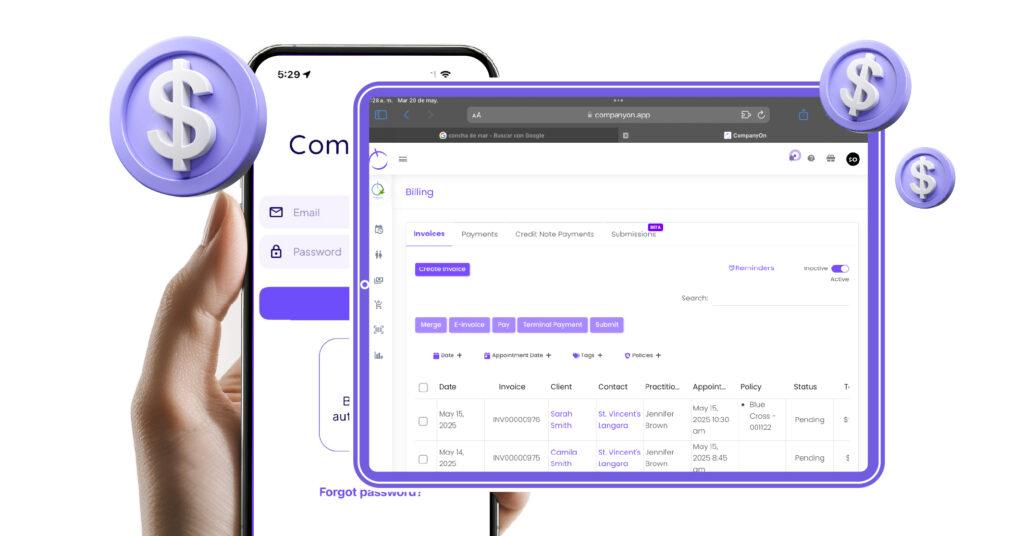
CompanyOn

1. Save Money and Simplify Bookkeeping

Understanding where your money goes is essential. With CompanyOn’s invoicing and bookkeeping capabilities, every transaction and overhead cost is automatically tracked and organized in real time.

This means:

  • No need to outsource bookkeeping.

  • Instant visibility into your practice’s financial health.

  • Fewer surprises come tax season.

You’ll have all the tools to catch issues early and make informed decisions faster.

2. Strengthen Transparency and Trust with Clients

Your invoicing process reflects your professionalism. CompanyOn allows you to create and send branded invoices quickly, making it easier to communicate fees clearly and avoid misunderstandings.

By being transparent about costs and providing digital receipts, you:

  • Build trust with patients.

  • Reduce payment disputes.

  • Offer a more seamless billing experience.

Explore more ways to improve the patient financial experience.

3. Support a Sustainable and Paperless Practice

Going green isn’t just good for the planet—it’s good for business. With CompanyOn’s invoicing system, everything is stored securely in the cloud, removing the need for printed invoices and physical storage.

This means:

  • Less paper waste and fewer printing costs.

  • Easier access to past records.

  • Compliance-ready documentation at your fingertips.

Going digital aligns with your efforts toward sustainability in healthcare.

4. Save Time and Boost Administrative Efficiency

Manual invoicing is time-consuming and prone to error. Whether you’re serving 5 or 50 patients, automation allows you to generate multiple invoices in seconds, with predefined templates and service fees.

You’ll also enjoy:

  • Integrated online payment options for quicker reimbursements.

  • Automatic tracking and reminders.

  • Less risk of lost or misplaced invoices.

All this adds up to a more productive practice—giving you more time to focus on what matters: quality patient care.

Ready to Upgrade Your Practice?

At CompanyOn, we’re committed to helping solo practitioners run efficient, modern businesses. Our electronic invoicing feature is part of a powerful suite of tools built specifically for healthcare professionals looking to simplify operations and improve outcomes.

👉 Book a free demo or start your free trial today and see the impact for yourself.

Business is better when it’s simpler. Let us help you get there.

To learn more about these benefits and many more, sign up for your free trial or book a demo. Don’t just take us at our word with regards to these many benefits either, have a look through our positive customer testimonials online to see how our services can improve your solo practitioner business today!

With CompanyOn by your side, business really is that simple.

Ready to make the switch?

Try Our Platform Free for 14 days.

See CompanyOn in Action

Schedule A Free 1:1 Personalized Demo

5 Ways a Mobile App Can Help You See More Patients and Work Less

Balancing patient care with the daily operations of a healthcare practice is no small feat—especially when you’re working solo. The administrative load, appointment management, billing, and documentation can easily consume valuable hours. Fortunately, modern tools like a mobile clinic app can change how you manage your time, enabling you to see more patients, deliver high-quality care, and reduce your workload.

Here are five impactful ways a mobile healthcare app can help you optimize your workflow, enhance your services, and achieve greater efficiency as a clinician.

1. Manage Your Entire Practice On the Go

With the right app, your practice is always within reach—whether you’re at home, between visits, or working remotely. Mobile access allows you to view patient files, update records, check appointments, and even process payments from any device. This level of flexibility helps you stay responsive and in control, no matter where you are.

Discover how to run your entire healthcare practice from your phone and maintain your operations seamlessly.

2. Automate Scheduling and Reduce No-Shows

One of the biggest challenges for independent practitioners is managing appointment flow efficiently. Mobile apps equipped with automated reminders, digital waitlists, and rescheduling features help reduce no-shows and late cancellations—keeping your schedule optimized and your revenue steady.

To dig deeper, explore strategies in our article: Adopting appointment reminders to increase revenue and decrease no-shows.

3. Simplify Clinical Documentation

Documenting patient encounters in real-time can improve both accuracy and compliance. A mobile app enables you to chart directly during or immediately after consultations—no more handwritten notes or end-of-day catch-ups. The result: fewer errors, more consistent records, and stronger patient outcomes.

Learn how to optimize EHR documentation for better patient care and streamline your clinical process.

4. Enhance Patient Engagement Anytime, Anywhere

Staying connected with patients doesn’t have to mean more phone calls or emails. Mobile apps allow for secure messaging, appointment confirmations, and even virtual visits, all of which boost patient satisfaction and loyalty. Providing convenience on their terms helps build trust and long-term relationships.

See how digital tools can empower patient communication and improve the overall patient experience.

5. Eliminate Manual Admin Work

From invoicing to form collection, many repetitive tasks can be automated with a robust mobile platform. This automation not only saves time but also minimizes errors and speeds up cash flow—giving you more time to focus on care rather than paperwork.

Read how you can optimize your practice’s workflow with smart technology that handles the admin for you.

Turn Efficiency Into Growth

By embracing a mobile-first approach, you’re not just keeping up—you’re building a smarter, more scalable practice. Whether your goal is to grow your client base, reduce operational stress, or create more work-life balance, a mobile app can be the catalyst that helps you get there.

At CompanyOn, we equip independent healthcare professionals with innovative tools that simplify day-to-day operations and support sustainable growth.

👉 Want to take control of your time and boost productivity? Contact us and discover how CompanyOn can transform your practice.

Ready to make the switch?

Try Our Platform Free for 14 days.

See CompanyOn in Action

Schedule A Free 1:1 Personalized Demo

How to Run Your Entire Healthcare Practice from Your Phone

In today’s fast-paced digital age, mobility isn’t just a perk—it’s a competitive advantage. Thanks to powerful mobile healthcare apps, independent healthcare providers and solo practitioners can now run their entire practice from their phone, without sacrificing professionalism, compliance, or patient satisfaction.

Why Go Mobile?

Running your practice remotely gives you unmatched flexibility. Whether you’re managing home visits, offering telehealth consultations, or operating a mobile clinic, the right practice management app puts your entire operation at your fingertips. With a secure, feature-rich mobile solution, you can:

  • Schedule and manage appointments

  • Document patient encounters

  • Bill and collect payments

  • Communicate with patients

  • Track clinical and financial data

…all from a single device.

Key Features to Look for in a Mobile Healthcare App

1. Mobile Appointment Scheduling

A modern app should offer an intuitive mobile calendar that allows you to view, update, and confirm appointments in real time. Tools like automated scheduling can reduce back-and-forth communication and no-shows.

2. Digital Clinical Notes and Charting

Document visits on the go with integrated patient charting features. Create SOAP notes, update records, and access health histories—all from your phone.

3. Mobile Invoicing and Payments

A strong mobile platform should let you merge invoices, issue receipts, and process payments directly from your device, accelerating your revenue cycle and minimizing administrative burden.

4. Secure Messaging and Patient Communication

Engaging patients through secure messaging fosters trust and clarity. Learn how to enhance engagement using digital tools in our article on leveraging technology for better client engagement.

5. Data Security and Compliance

Ensure your mobile solution complies with regulatory standards by offering data encryption, secure access controls, and reliable cloud backups. For a deeper dive, explore cloud data security for healthcare providers.

Benefits of Mobile Practice Management for Solo Practitioners

Solo practitioners face unique challenges—limited administrative support, time constraints, and the need to balance care delivery with business management. A mobile-first approach directly addresses these concerns:

  • Time Savings: Quickly update records, check your schedule, or send invoices while on the move—no need to wait until you’re back at your desk.

  • Cost Reduction: Minimize overhead costs by avoiding unnecessary hardware, paper documentation, or complex software installations.

  • Improved Client Experience: Offer faster response times, on-the-spot scheduling, and digital receipts, enhancing client satisfaction and retention.

  • Greater Flexibility: Adapt to patient needs by offering home visits, virtual consultations, or flexible hours with full access to your practice tools.

This mobile capability aligns perfectly with the evolving needs of modern healthcare consumers, who increasingly expect digital-first services.

Transitioning to a Mobile-First Practice

Adopting a mobile-first approach doesn’t require a full overhaul overnight. Here are some smart steps to ease the transition:

  • Evaluate your current workflow: Identify where inefficiencies lie and where mobile tools can simplify tasks.

  • Start with the essentials: Begin using mobile features like appointment booking and invoice creation.

  • Train your team (if applicable): Make sure everyone knows how to use the app and follows best practices for data handling.

  • Choose the right platform: Opt for a solution built specifically for solo and small healthcare practices—like CompanyOn.

Real-World Use Cases: Running a Practice on the Go

Here are a few examples of how practitioners are using mobile apps to transform care delivery:

  • Mobile foot care nurse: Uses route planning and dynamic forms to manage patient visits and collect consent digitally.

  • Massage therapist: Leverages online booking and mobile invoicing to offer a seamless, paperless experience.

  • Telehealth provider: Manages a fully remote clinic with integrated telemedicine features and mobile documentation tools.

These use cases show how mobile tools empower healthcare professionals to maintain quality, responsiveness, and professionalism—without being tied to a desk.


Take Control of Your Practice—From Anywhere

With CompanyOn’s mobile-ready platform, you gain full control over your appointments, documentation, and billing—wherever your day takes you.

📱 Start your 14-day free trial
📅 Book a demo and discover how our tools can help you run your entire clinic remotely with ease.

Ready to make the switch?

Try Our Platform Free for 14 days.

See CompanyOn in Action

Schedule A Free 1:1 Personalized Demo

What Is EVV and Why It Matters to Your Practice More Than You Think

In the evolving landscape of home healthcare, Electronic Visit Verification (EVV) is no longer a nice-to-have—it’s a regulatory requirement and a competitive necessity. For independent healthcare providers and solo practitioners, understanding and implementing EVV isn’t just about compliance—it’s about building trust, improving efficiency, and ensuring accountability.

EVV

What is Electronic Visit Verification (EVV)?

EVV is a technology-based system that verifies key details of in-home visits such as:

  • The date and time a service begins and ends

  • The location of the visit

  • The identity of the provider

  • The type of service provided

  • The individual receiving the service

This system helps healthcare agencies and practitioners track and document home visits accurately, preventing fraud, ensuring the delivery of care, and aligning with federal and provincial compliance mandates.

Why EVV Matters for Your Practice

1. Ensures Compliance with Regulations

Since the 21st Century Cures Act, EVV compliance has been mandated in many jurisdictions, particularly in home-based care. Non-compliance can result in claim denials or penalties. For clinicians, adopting an EVV system is essential for regulatory adherence and uninterrupted reimbursement from insurers and public payers.

2. Strengthens Accountability

With real-time tracking and digital records, EVV allows solo practitioners and home care providers to demonstrate when and where care was delivered. This builds transparency with clients and stakeholders, ultimately protecting your practice from disputes or legal issues.

3. Enhances Patient Trust and Experience

Patients and families gain peace of mind knowing care is being delivered as promised. Combined with digital tools for patient communication and scheduling—such as those discussed in our article on facilitating provider-patient communications—EVV becomes part of a comprehensive client experience strategy.

4. Streamlines Operations and Documentation

Manual tracking of home visits is prone to errors. An EVV system automates this process, saving you time and reducing administrative burden. Want to go further? Learn how to optimize your workflow with smart technology.

How to Implement EVV in Your Practice

Here are the basic steps to get started:

  • Choose an EVV-enabled system: Look for solutions that offer GPS tracking, mobile app support, and integration with your billing system.

  • Train your team: Ensure that you and your staff understand how to use the technology efficiently.

  • Stay up-to-date: Regulations around EVV are evolving. Subscribe to updates from your regional health authorities or professional associations.

Related Considerations for Independent Providers

If you’re managing care delivery across multiple locations, EVV can be integrated with tools like route maps to improve scheduling and reduce travel time. Additionally, digitizing your patient intake process can further optimize care delivery logistics.

Conclusion

EVV is more than a legal checkbox—it’s a strategic asset for modern healthcare practices. It enhances compliance, increases efficiency, and builds trust with clients and payers alike.


Ready to Make EVV Work for You?

At CompanyOn, we empower healthcare professionals with digital tools tailored for independent practice management. From EVV-ready mobile platforms to digital charting, online scheduling and e-invoicing, we help you stay compliant while delivering quality care.

🚀 Start your 14-day free trial today or
📅 Book a personalized demo to see how our platform supports EVV and more.

Ready to make the switch?

Try Our Platform Free for 14 days.

See CompanyOn in Action

Schedule A Free 1:1 Personalized Demo

How to Prepare for Healthcare Emergencies in a Solo Practice

When you run a solo healthcare practice, you are not only responsible for your patients’ well-being—but also for the continuity of your business during unforeseen events. From natural disasters to pandemics and sudden staff shortages, having an emergency preparedness plan is not optional—it’s essential.

In this article, we’ll explore how to build a proactive and reliable emergency plan tailored to the realities of solo healthcare providers.

1. Understand the Risks Relevant to Your Practice

The first step in solo practice emergency preparedness is to assess the types of emergencies most likely to impact your operations. These could include:

  • Natural disasters (floods, fires, earthquakes)

  • Power or internet outages

  • Medical emergencies involving a patient or yourself

  • Cybersecurity threats or data breaches

  • Public health emergencies (e.g., pandemics)

Once you identify your top risks, you can begin outlining a plan to mitigate and respond to them.


2. Create a Healthcare Contingency Plan

Your healthcare contingency planning strategy should ensure that your practice can continue functioning, or safely pause and resume, depending on the scenario. Your plan should cover:

  • Alternative communication channels with patients

  • Data access and backup protocols

  • Temporary relocation options if your location becomes unusable

  • Emergency staffing or referral partners

  • Checklists for continuity of care during disruptions

CompanyOn offers cloud-based solutions that enable you to access records and schedules securely from anywhere—making business continuity easier to manage.


3. Establish Clear Medical Emergency Protocols

Having medical emergency protocols in place can help you react quickly and appropriately during high-stress situations. Consider the following:

  • Keep first aid kits, defibrillators, and oxygen supplies easily accessible

  • Ensure emergency contact lists are updated regularly

  • Train yourself and any support staff in basic life support (BLS) or CPR

  • Have a script or written protocol for how to contact emergency services, notify family members, and document the incident


4. Train and Inform Your Patients

Yes, even your patients play a role in emergency preparedness. Inform them during their onboarding or intake process about:

  • How you will notify them of cancellations or closures

  • What digital tools (like CompanyOn’s patient portal) they can use to reschedule or reach you

  • How they can access their health records if needed

Building trust and transparency is part of what makes a patient-centered healthcare culture, even in times of crisis.


5. Secure Your Digital Infrastructure

In the digital era, safeguarding patient data is non-negotiable. Protect your systems by:

  • Using encrypted, cloud-based platforms like CompanyOn for patient information

  • Regularly backing up data

  • Implementing multi-factor authentication

  • Having a cybersecurity incident response plan

This will help avoid critical disruptions that can stem from data breaches or technical failures.


6. Review and Test Your Emergency Plan Regularly

Emergency plans aren’t meant to sit in a drawer. Make sure to:

  • Review your plan at least once a year

  • Conduct mock drills or tabletop exercises

  • Update contact lists and emergency supply inventories

Proactive review ensures that your emergency preparedness evolves alongside your practice.


Conclusion

As a solo practitioner, your ability to respond to emergencies reflects not only your professionalism but your commitment to patient safety and continuity of care. By embracing a structured approach to solo practice emergency preparedness, you can protect your business, your patients, and your peace of mind.

With CompanyOn, you can count on digital tools designed to support healthcare providers during both daily operations and unexpected challenges.

👉 Explore how CompanyOn helps you stay prepared and resilient

Ready to make the switch?

Try Our Platform Free for 14 days.

See CompanyOn in Action

Schedule A Free 1:1 Personalized Demo