
From Your First Patient to 30 – How to Grow Your Home Nursing Business

Starting your journey as a nurse entrepreneur is a huge milestone. But turning that first patient into a full, steady caseload of 30 requires strategy, consistency, and the right tools. Growing your home nursing business is about more than delivering care—it’s about building a sustainable, scalable healthcare practice.

In this guide, you’ll learn how to grow your client base by understanding patient needs, refining your services, and adapting to the unique demands of your local market.

CompanyOn

🎯 Step 1: Know Exactly Who You’re Serving

Sustainable growth starts with clarity. When you know who your ideal patient is, you can build services that speak directly to their needs—and attract them more easily.

Ask yourself:

  • Do I specialize in post-op care or chronic condition support?

  • Do I enjoy working with seniors, individuals recovering from surgery, or mobility-limited patients?

  • Is there a growing aging population or specific underserved groups in my area?

📌 Need help defining your ideal patient?
How to Define Your Ideal Patient and Grow Your Business as a Nurse Entrepreneur


💡 Step 2: Start with High-Demand Services

Don’t offer everything right away. Focus on 1–2 key services that are in high demand and that you can deliver with excellence. These might include:

  • Chronic care management at home

  • Post-hospital recovery support

  • Medication management

  • Patient education and caregiver training

  • Home functional assessments

This focus allows you to deliver more value, create better outcomes, and build a strong reputation in your niche.

📖 Read real success stories:
Serenity Footcare Services: Success Story


🧰 Step 3: Build a Scalable System from Day One

As your client base grows, relying on paper notes or manual scheduling will slow you down. Set up a clinic management system early to support your growth.

With a platform like CompanyOn, you can:

  • Automate appointment booking and reminders

  • Send invoices and accept payments

  • Track patient history and notes securely

  • Use location filters and route maps for efficient travel

🗺️ Learn how to plan your day effectively:
How to Save Time by Planning Your Visits with Route Maps


📣 Step 4: Use Feedback to Sharpen Your Value

Every patient interaction is a learning opportunity. Ask:

  • What did they appreciate the most?

  • What could have been better?

  • How did they find your services?

Use this insight to refine your messaging, your service offerings, and your home healthcare marketing strategy.

💻 Improve your digital presence:
Boost Your Clinic’s Online Presence: Effective Digital Marketing Strategies


🤝 Step 5: Build a Referral Network

Word-of-mouth referrals are one of the fastest ways to scale your business. Here’s how to encourage them:

  • Ask happy patients for testimonials and referrals

  • Partner with local clinics, pharmacies, and rehab centers

  • Establish relationships with primary care doctors

🔗 Learn how to create a strong referral pipeline:
How to Build a Medical Referral Network to Grow Your Practice


🚀 Step 6: Grow Without Losing the Human Touch

Growth should never come at the expense of care quality. Use digital tools to maintain a personalized experience, even as your caseload increases.

CompanyOn helps solo practitioners:

  • Maintain HIPAA-compliant communication

  • Manage schedules with fewer administrative hours

  • Provide patients with reminders and digital touchpoints

  • Offer a seamless client experience from intake to follow-up


Final Thoughts

Going from your first patient to a thriving client base is possible with the right plan in place. Focus on:

✅ A clear patient profile
✅ High-impact services
✅ Scalable systems
✅ Ongoing optimization and referrals

💬 Ready to scale your independent nursing practice?
CompanyOn provides the digital infrastructure to support your growth—so you can focus on care.

👉 Explore our solutions for independent providers
Start your free trial today

Ready to make the switch?

Try Our Platform Free for 14 days.

See CompanyOn in Action

Schedule A Free 1:1 Personalized Demo

How to Define Your Ideal Patient and Grow Your Business as a Nurse Entrepreneur

Launching a home nursing business as an independent nurse is a powerful step toward professional freedom. But if you’re trying to serve everyone, you’ll likely connect with no one. Success begins with knowing exactly who your ideal patient is and tailoring your services to meet their specific needs.

Whether you’re just starting your practice or looking to grow, this guide will walk you through identifying and attracting your target client—and building a sustainable business around them.

Why Defining Your Ideal Patient Matters

For nurse entrepreneurs, clarity is your greatest asset. When you clearly define your ideal patient:

  • You attract clients who align with your skills and passion

  • You save time and money by focusing your marketing efforts

  • You improve patient outcomes with more relevant services

  • You build a reputation as a trusted specialist in your niche

🧠 Related reading: How to Start Your Independent Medical Practice


Step 1: Reflect on Your Strengths and Experience

Start with what you know.

Ask yourself:

  • What patient populations have I enjoyed working with the most?

  • What conditions or care types do I specialize in?

  • Do I prefer short-term recovery care, chronic illness support, palliative care, or mobility assistance?

Choosing a focus aligned with your background not only boosts confidence but also increases credibility.


Step 2: Conduct Local Market Research

Understanding the needs of your local community is essential. Use the following methods to gather insights:

  • Google Trends and local search: What healthcare services are being searched in your area?

  • Facebook groups: What challenges are families facing in caregiving?

  • Referrals from clinics or pharmacies: What gaps exist in home care?

  • Public health data: Are chronic conditions or aging populations growing in your region?

🔍 Tip: Market Analysis and Niche Identification for Healthcare Providers offers step-by-step guidance on this.


Step 3: Create a Clear Ideal Patient Profile

Now it’s time to define your “perfect client” in detail. Include:

  • Age range

  • Health conditions or service needs

  • Location proximity

  • Insurance coverage or private pay preferences

  • Personality or family dynamic (e.g. open to education, responsive to communication)

This profile will inform your marketing, website messaging, and care delivery.


Step 4: Align Services with What Your Ideal Patient Needs

Instead of offering every service under the sun, focus on high-impact solutions like:

  • Post-hospitalization home visits

  • Foot care or wound care at home

  • Chronic disease monitoring

  • Caregiver education and training

  • Virtual follow-ups via telehealth

Build care packages that speak directly to your client’s pain points.

📦 See how other nurses have built focused services: Diane’s Footcare Practice Journey to Success


Step 5: Craft Your Message to Connect

With your ideal client in mind, refine your marketing:

  • Highlight outcomes, not just tasks (“regain independence,” “safe recovery at home”)

  • Use testimonials or case studies from similar patients

  • Optimize your website content with phrases your audience is searching for (e.g. “in-home wound care for seniors”)

  • Establish trust through content like Patient Education Materials


Step 6: Choose the Right Tools to Scale Your Impact

Once you start attracting your ideal patients, you need systems that can scale your operations:

Scheduling & Waitlist Tools
Automated Invoicing and Documentation
Secure Messaging
Online Presence Management

CompanyOn offers all-in-one tools designed specifically for independent nurse businesses, so you can focus on care while we handle the rest.

🚀 Learn more: Independent Healthcare Practitioners Solutions


Final Thoughts

Defining your ideal patient is one of the most strategic moves you can make as a nurse entrepreneur. It enables you to deliver more focused care, stand out in your market, and build a business that aligns with your values and strengths.


Ready to Launch or Grow Your Home Nursing Business?

📈 Start strong with CompanyOn’s support for in-home nursing services and digital tools for nurse-led practices.

👉 Explore Our Platform
📝 Get Started Today with a Free Trial

Ready to make the switch?

Try Our Platform Free for 14 days.

See CompanyOn in Action

Schedule A Free 1:1 Personalized Demo

Mastering Time Management: How to Streamline Your Schedule as a Solo Healthcare Provider

If you’re looking for ways to improve your productivity, here are some tips on how CompanyOn’s booking management app organizes and frees up time so you can focus on more important things.

  • Get rid of distractions
  • Use CompanyOn’s scheduling app to prioritize your time and tasks
  • Convert your to-do list into a schedule for maximum productivity
  • Organize your appointments by due date, relevance, location, and/or priority
  • Track the time you spend on each task to identify areas for improvement

1. Set Up Reminders and Alerts so your client never misses an appointment.

CompanyOn’s appointment scheduling automatically sends reminders by email or text to clients before an appointment is due. You can set when to send these reminders manually as well.

This offers you a safeguard to help prevent the problem of no-shows if you are running a clinic and reminds clients of your visit. For those that don’t have CompanyOn as the platform to help manage their appointments, implementing such a process is a must.

2. Use the scheduler filters to view appointments based on location and clients’ needs.

One of the most effective ways to manage your appointments is to understand where you need to go and what you need to consider in advance of your visit. By using tags to identify the location of your clients or any specific information you would like to have for each of your clients, you can easily filter it to consider it in CompanyOn’s scheduling system. It can help you manage your time and plan your route ahead.

3. Use CompanyOn’s appointment reports to stay organized

To stay on track with your daily tasks, you can use CompanyOn’s appointment report prior to your visits. Making it ideal for seeing the big picture of your day ahead. The more carefully you plan your daily tasks, the more output you can expect from your day.

4. Make Use of CompanyOn’s waitlist

By having a list of patients who would like to be seen as soon as possible, you can frequently fill late cancellation appointment slots. You can simply tap into the list to schedule a visit right away and connect with your client to confirm their availability.

Make sure that your list is up to date and readily accessible.

A system like this increases client confidence and helps someone be seen sooner while saving you time and stress.

At CompanyOn, we’re committed to supporting our community of solo practitioners, no matter if they are just thinking in pursuing professional independence, or they are already well established solo practitioners.

Ready to make the switch?

Try Our Platform Free for 14 days.

See CompanyOn in Action

Schedule A Free 1:1 Personalized Demo
How to Improve Patient Retention with Automated Appointment Reminders

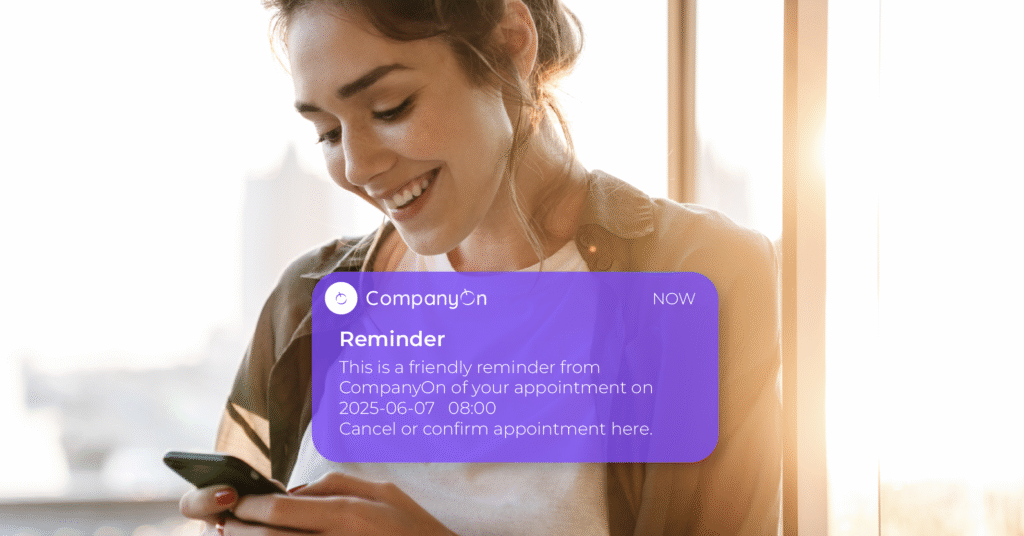
In a world where patients are increasingly busy and distracted, automated appointment reminders are no longer a luxury—they’re essential. Whether you’re a solo practitioner or run a small healthcare clinic, reducing no-shows and keeping your patients engaged are key to boosting retention and maintaining a healthy practice.

Let’s explore how this simple automation tool can have a powerful impact on your patient retention strategy.

Why Patient Retention Matters

Acquiring a new patient costs 5 to 25 times more than retaining an existing one. Yet, many practices unknowingly lose clients due to missed appointments and lack of follow-up.

Strong patient retention leads to:

  • Higher revenue stability

  • Better continuity of care

  • Increased patient satisfaction and trust

  • More efficient scheduling and planning

📚 Explore related strategies in Maximizing Patient Retention: Proven Strategies for Independent Clinics


The Impact of Missed Appointments

No-shows and late cancellations can seriously disrupt your operations:

  • Wasted time slots and revenue

  • Disrupted care plans

  • Administrative headaches

  • Decreased morale for healthcare providers

By simply introducing automated reminders, you can significantly reduce no-shows and cancellations—and enhance the overall patient experience.


How Automated Reminders Work

Automated appointment reminders are sent via email or SMS at scheduled intervals before an appointment. With CompanyOn, reminders are customizable and can include:

  • Confirmation and cancellation options

  • Links to virtual sessions (for telehealth)

  • Personalized instructions or forms

🔄 Learn how the feature works step-by-step: Confirmation & Cancellation of Appointments Online


Key Benefits for Patient Retention

Here’s how automated reminders can directly enhance your retention rates:

1. Reduce No-Shows and Last-Minute Cancellations

When patients are reminded in advance, they’re more likely to attend—or cancel with enough time to rebook.

2. Improve Communication and Trust

Consistent, timely communication makes patients feel cared for, organized, and connected to your practice.

3. Free Up Admin Time

Reduce the number of follow-up calls your staff needs to make. Focus on care, not calendars.

4. Rebook Missed Slots Faster

Combine reminders with tools like the Waitlist Feature to fill cancelled appointments efficiently.


Best Practices for Using Appointment Reminders

To get the most out of this tool, keep these tips in mind:

  • Send multiple reminders (e.g., 48h and 24h before)

  • Include an easy way to confirm or cancel

  • Make your messages clear, concise and friendly

  • Use the patient’s preferred communication method

  • Track analytics to improve your reminder timing

📈 Tip: Monitor your no-show rate trends inside your CompanyOn Dashboard


Final Thoughts

Automated appointment reminders are a simple yet powerful tool to retain more patients, reduce administrative stress, and increase operational efficiency. In the age of digital healthcare, this small automation makes a big difference.


Start Automating Your Reminders with CompanyOn

Ready to reduce no-shows and improve patient satisfaction?

📲 Try CompanyOn’s full suite of patient engagement tools, including reminders, waitlists, invoicing, and secure messaging.

👉 Get started with a free trial
🔍 Learn more about how we support independent providers

Ready to make the switch?

Try Our Platform Free for 14 days.

See CompanyOn in Action

Schedule A Free 1:1 Personalized Demo
Confirmation & Cancelation of Appointments online Feature

Managing appointments efficiently is crucial for solo healthcare practitioners. With CompanyOn’s Confirmation & Cancellation of Appointments Online feature, your clients now have the flexibility to respond to appointment reminders in real time—without needing to call or email your practice.

A smoother scheduling experience means fewer no-shows, better communication, and more time focused on patient care.

🗓️ What Does This Feature Do?

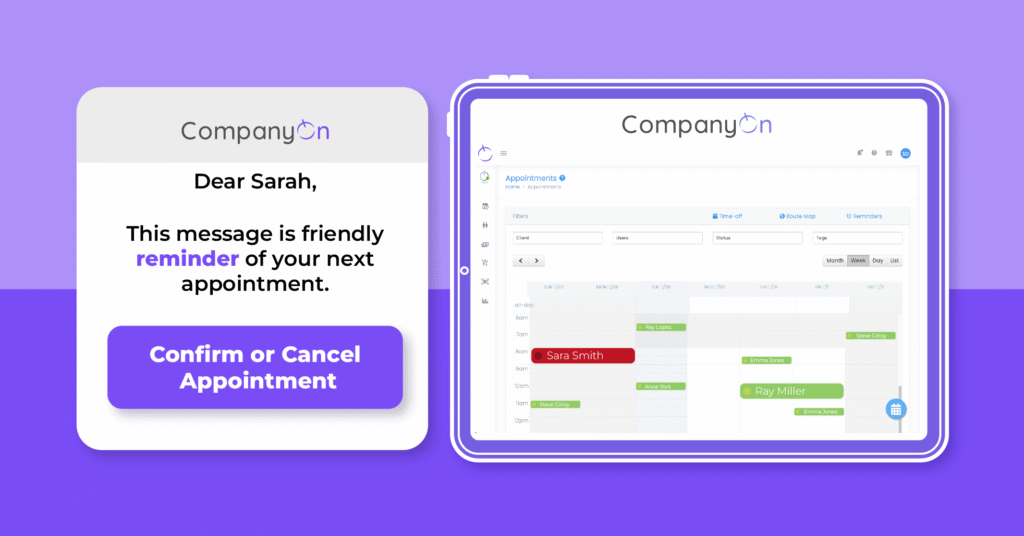
This feature allows clients to confirm or cancel their upcoming appointments directly from the appointment reminder emails or text messages sent via the CompanyOn platform.

📲 This complements our appointment reminder automation tool designed to improve show-up rates and clinic efficiency.


🔧 How It Works – Step by Step

1. Clients Receive the Reminder

Whenever an appointment reminder is sent out (based on your preset schedule), the message includes interactive options:

  • Confirm Appointment

  • Cancel Appointment

This applies whether the reminder is sent via email or SMS.


2. Client Confirms the Appointment

If the client taps or clicks “Confirm”, their confirmation is registered by the system. No further action is required from the provider.

  • ✔️ The status in your calendar remains unchanged.

  • 🔔 No email notification is sent to you, since the appointment is still valid.


3. Client Cancels the Appointment

If the client selects “Cancel”, a window pops up asking them to provide a reason for cancellation.

Appointment Cancelled Message

Once they submit the cancellation:

  • 📩 You receive a notification via email.

  • 🗓️ The appointment is marked in red on your CompanyOn calendar as Cancelled.

💡 Want to learn more about improving your calendar management? Visit our post on instant scheduling tools.


🎯 Why This Feature Matters

This feature was created to:

  • Enhance client-practitioner communication in real time

  • Reduce the administrative load on solo providers

  • Improve appointment workflow and minimize gaps in your calendar

  • Provide clarity for both parties, saving time and resources

🔗 Combine this with our Waitlist Management Tool to quickly rebook cancelled slots and maintain productivity.


✅ Start Using It Today

You don’t need to enable anything manually—this feature is active on your account if you’re already using automated reminders.

Need help setting up your reminders? Check our guide:
👉 How to Set Up Automated Appointment Reminders


Ready to simplify appointment management?

CompanyOn provides everything you need to run and grow your independent healthcare practice—from scheduling and invoicing to clinical documentation and compliance.

📅 Try CompanyOn Free for 14 Days
💬 Speak with Our Team
🔍 Explore All Features

Ready to make the switch?

Try Our Platform Free for 14 days.

See CompanyOn in Action

Schedule A Free 1:1 Personalized Demo